Best for
Who should buy it
Midrange to high-end gaming PCs, modern GPU builds that need native 12V-2x6 cabling, clean-cable builds, and cases that leave room beside the PSU.
 Our Method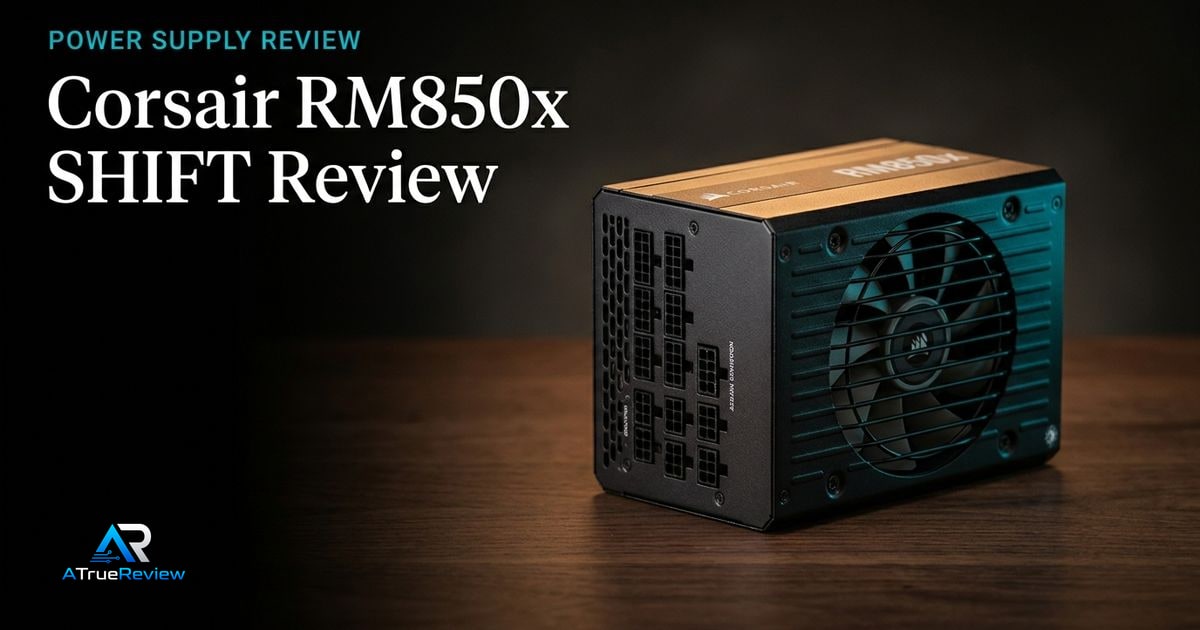
Power supply review
A review of the Corsair RM850x SHIFT, focused on whether its ATX 3.1 platform, native 12V-2x6 cable, and side-mounted connector layout are worth paying for in a real build.
Verdict
Recommended
A practical 850 W ATX 3.1 PSU candidate for modern gaming and creator builds, provided the case has enough clearance for its side-mounted cable interface.
Best for
Midrange to high-end gaming PCs, modern GPU builds that need native 12V-2x6 cabling, clean-cable builds, and cases that leave room beside the PSU.
Skip if
Your case blocks side-mounted PSU connectors, you need more than 850 W, you want a cheaper non-ATX 3.1 unit, or you require final load, ripple, transient, and noise test results before buying.
Test window
Launch brief based on Corsair product documentation. Hands-on load regulation, ripple, transient, protection, cable-temperature, acoustic, and case-clearance testing is still required before final scoring.
Specs
Key findings
The Corsair RM850x SHIFT is the cleanest answer to a specific 2026 build problem: how do you put a modern NVIDIA GPU into a clean-cable PC without the adapter dongle and the connector anxiety that came with the first 12VHPWR generation? The SHIFT solves it with a native 12V-2x6 cable, an ATX 3.1 platform, and a side-mounted modular interface that keeps the rest of the cabling tidy.
It also creates a new constraint — case clearance — that did not exist before. Whether the trade is worth it depends entirely on the case you are building into.
The strongest case is build practicality. Corsair’s official product page lists native 12V-2x6 cabling, ATX 3.1 certification, PCIe 5.1 compliance, Cybenetics Gold efficiency, A+ Cybenetics noise rating, 105 °C Japanese electrolytic capacitors, Zero RPM mode, and a 10-year warranty.
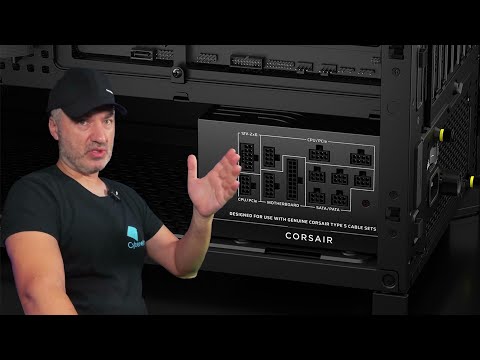
The side-mounted Type-5 connector layout is the differentiator. Cables exit from the side of the PSU directly toward the cable-management cutouts in the motherboard tray, instead of cornering around the PSU shroud opening. In a case that has the clearance for it, the cabling routes shorter, sits flatter, and looks cleaner without modder-grade extensions.
For builders pairing this with an RTX 5080 or other current NVIDIA card, the native cable plus ATX 3.1 transient-handling spec is the right combination.
PSU recommendations cannot be finalized from a spec page. The important results are electrical and thermal: voltage regulation across multiple load points, ripple suppression, transient response, hold-up time, fan ramp profile, cable temperature near the GPU connector, protection trip behavior, and whether the unit stays quiet in a real case.
The SHIFT layout is brilliant when the case has clearance. When it doesn’t, the cables fight you, the side panel doesn’t close, and you wish you had bought a traditional unit.
— The honest constraint
The case-clearance requirement is the largest practical risk. Corsair specifies 30 mm of clearance between the PSU and side panel for the Type-5 layout to work. Most modern mid-towers and full-towers comply — many compact, dual-chamber, and SFF-style cases do not. The PSU’s biggest selling feature becomes a deal-breaker in the wrong chassis.
Before any final scoring, the site needs to test multiple load points, transient spike behavior, 12V-2x6 cable seating force, cable temperature near the GPU connector, fan noise across load points, zero-RPM behavior, and case clearance in three or four common chassis sizes.
Usually yes, but only when the case turns the layout into an advantage instead of a headache. The RM850x SHIFT earns its keep when the build includes a modern NVIDIA GPU, the buyer wants a native 12V-2x6 cable, and the chassis has enough side clearance to make the Type-5 routing cleaner and easier to service over time.
It is not worth paying extra for on principle alone. If the case is compact, the side panel clearance is marginal, or the buyer simply wants the cheapest reliable ATX 3.1 platform, then the SHIFT’s signature feature stops being a benefit and becomes something else to work around.
The 850 W ATX 3.1 segment has matured fast. Seasonic’s Vertex GX-850 is the traditional-layout alternative — equivalent quality, lower price, no side-mounted advantage. The be quiet! Pure Power 12 M 850 W is the quieter pitch with a more conservative platform. Corsair’s own RM1000x SHIFT is the right family member for builders who want headroom for a halo GPU plus a heavy CPU.
The honest framing: the RM850x SHIFT wins when build aesthetics matter and the case fits its layout. It loses when the case does not, or when the buyer simply wants the cheapest reliable ATX 3.1 unit. None of these PSUs is a poor choice — the differentiation is mostly cosmetic and price-tier.
If you are building a clean-cable PC into a roomy mid-tower or full-tower, plan to run a modern NVIDIA GPU, and care about cable aesthetics, the RM850x SHIFT is the right unit. If your case is compact or dual-chamber, look at the traditional Vertex GX-850 instead. If you need more headroom for a halo GPU and a flagship CPU under heavy load, step up to the 1000 W version of the same family.
The provisional verdict: a strong modern PSU pick for the right case, with the right modern GPU, in builds where cable aesthetics and native cabling earn their keep. Final score depends on electrical, thermal, and noise testing, which is the part of every PSU review that actually matters most. For shortlist context, route back through best power supplies, power supplies, or the wider computing hub.
Verdict shape
Pros
Cons
Alternatives
FAQ
ATX 3.1 is the latest power supply specification. The headline change is improved handling of modern GPU transient spikes — the very fast load excursions that broke older "compliant on paper" PSUs. If you are running an RTX 40-series or 50-series card, ATX 3.1 is strongly recommended. For everything else, ATX 3.0 is still fine.
Instead of the traditional rear-of-PSU cable interface, the modular sockets sit on the side of the PSU facing the side panel. Cables exit cleanly toward the back of the motherboard tray instead of bending awkwardly through the PSU shroud opening. This looks better and routes shorter — but the case needs at least 30 mm of clearance on the side. Tight cases will not close.
Most modern mid-towers and full-towers do, but not all. Measure the gap between the PSU mount and the side panel before buying. Cases like the [Fractal North XL](/reviews/fractal-north-xl-review/) have ample clearance. SFX-style or dual-chamber compact cases often do not.
Yes, with margin, for most builds. NVIDIA recommends an 850 W minimum for the RTX 5080. If you are also pushing a flagship CPU at unrestricted power limits or running heavy peripherals (capture cards, multiple drives, large fan arrays), step up to 1000 W. See the [RTX 5080 review](/reviews/nvidia-geforce-rtx-5080-review/) for the build context.
The 12V-2x6 connector family has had documented seating and overheat issues, especially with adapter dongles from older PSUs. A native cable terminates correctly at the PSU side and minimizes the number of joints between the PSU and the GPU. Every PSU buying decision for a modern NVIDIA card should start with "is the GPU cable native."
850 W continuous output, fully modular.
Yes. It is ATX 3.1 certified and PCIe 5.1 compliant, with a native 12V-2x6 (16-pin) GPU cable.
Corsair specifies 30 mm of clearance between the PSU and the side panel for the side-mounted connectors.
Cybenetics Gold efficiency and a Cybenetics A+ acoustic rating, with a 140 mm Zero RPM fan.
A 10-year warranty, with 105 C Japanese electrolytic capacitors.